
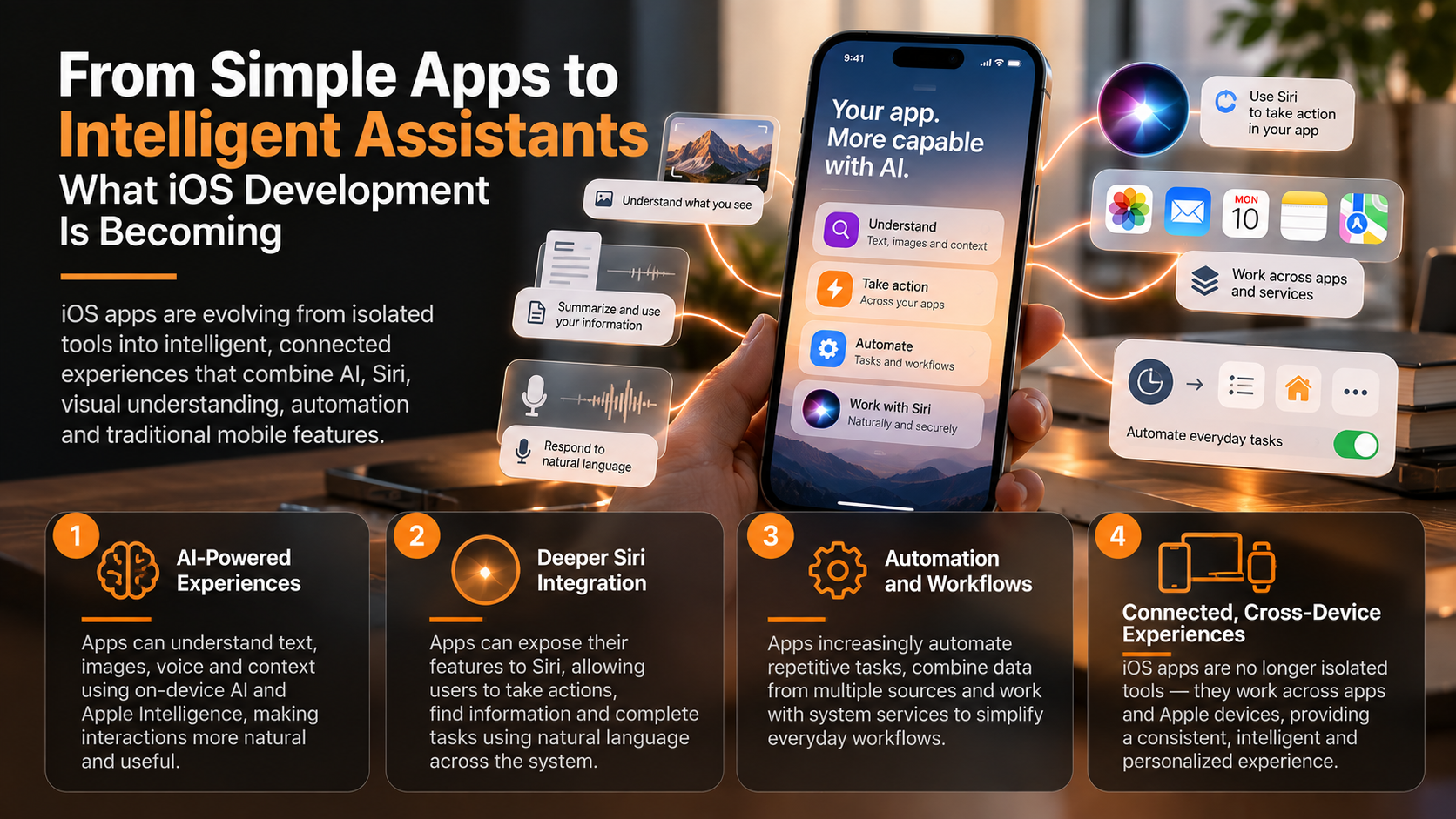
From Simple Apps to Intelligent Assistants: What iOS Development Is Becoming
iPhone apps are beginning to evolve beyond isolated tools. AI models, Siri, App Intents, visual intelligence and automation allow developers to build experiences that understand context, recognize what users see and help complete tasks across apps—while traditional mobile capabilities remain essential.
For most of the smartphone era, apps have operated as relatively isolated destinations. A user opened a weather app to check the forecast, launched a notes app to record information, opened a navigation app for directions and switched to a messaging app to communicate. Each application contained its own interface, data and set of functions, while the user was responsible for moving information between them. The traditional mobile-app model required people to understand which app contained the capability they needed and then navigate to it manually.
Artificial intelligence is beginning to change that relationship. Modern iOS development can combine generative models, Siri, App Intents, visual understanding, automation and established mobile capabilities such as notifications, maps, cameras and local storage. Instead of functioning only when somebody opens a particular screen and presses a particular button, applications can increasingly expose useful actions and information to the broader intelligence layer of the operating system. The app is gradually becoming less of an isolated destination and more of a capability that can participate in a larger user experience.
Apple’s development architecture increasingly reflects this direction. The Foundation Models framework gives developers access to Apple Intelligence models for tasks such as summarization, extraction, dialogue and understanding text and images, while App Intents exposes application actions and content to system experiences. Apple’s latest Siri architecture also uses App Intents, personal context and on-screen awareness to perform actions within and across apps.
This does not mean the conventional app is disappearing. Users still need interfaces for browsing, editing, configuration and complex workflows, while established mobile capabilities remain fundamental to useful software. What is changing is that the app interface is no longer necessarily the only doorway through which users can access what an application knows or can do.
AI Is Becoming a Capability Inside the App
The most obvious transformation is the integration of artificial intelligence directly into application functionality. Earlier generations of mobile software generally followed explicit rules: input entered the system, programmed logic processed it and a predictable output appeared. Generative models introduce another layer because software can interpret natural language, summarize information, extract concepts and generate responses without developers explicitly programming every possible linguistic variation.
Apple’s Foundation Models framework makes these capabilities available through Swift APIs. Developers can use Apple’s models for tasks including text generation, summarization, extraction, classification and dialogue, while tool calling allows a model to obtain information or invoke application functionality when necessary. Instead of building an application around fixed commands alone, developers can increasingly build around user intentions expressed in ordinary language.
Consider a travel application containing reservations, destination information and itinerary data. A conventional interface might require the user to navigate through separate sections for flights, hotels and activities, while an intelligent version could respond to a request such as, “Summarize tomorrow and tell me when I should leave for the airport.” The AI does not replace the underlying reservation database, mapping functionality or notification system; it creates a more flexible layer through which those capabilities can be combined.
This distinction is important because the strongest AI applications may not resemble standalone chatbots. A financial application might summarize a complicated transaction history, a productivity app might convert notes into structured tasks and a shopping application might explain differences between products. AI becomes most useful when it strengthens an application’s existing purpose rather than being added as an unrelated conversational feature.
On-device processing can make this integration particularly valuable on the iPhone. Apple’s Foundation Models framework provides access to its on-device model for suitable tasks, allowing some intelligent features to operate without sending every request to a remote server. Developers can therefore combine traditional local application data with AI while considering privacy, latency and connectivity as part of the architecture.
The result is a different definition of a “smart” application. Intelligence no longer needs to mean that an app contains a recommendation algorithm hidden somewhere in the background. An intelligent app can increasingly interpret what the user means, determine which application capabilities are relevant and help transform an intention into an action.
Siri and App Intents Are Moving Apps Beyond Their Own Interfaces
Siri represents another important part of this transition because it provides a system-level layer between users and individual applications. Historically, voice assistants often supported relatively narrow commands, and developers needed to integrate specific domains or shortcuts. App Intents has progressively created a broader mechanism for applications to expose actions, entities and content to system experiences.
An App Intent describes something an application can do. That might involve starting a workout, creating a task, finding a document, opening a particular piece of content or performing another meaningful operation. When app capabilities are expressed as intents, the operating system can potentially invoke them without requiring the user to manually reproduce the same sequence of taps.
Apple’s newer Siri architecture makes this increasingly significant. Apple says Siri AI can take hundreds of actions in and across apps using App Intents, while also drawing on personal context and what is visible on the screen when appropriate. That means an application can increasingly participate in a conversation or workflow initiated somewhere else rather than waiting for the user to open it first.
Imagine receiving a message containing information about a restaurant reservation. Instead of copying the address, opening Maps, checking travel time and manually creating a reminder, a sufficiently integrated assistant could understand the request and coordinate relevant application capabilities. The user thinks in terms of the goal—“help me get there on time”—rather than in terms of which sequence of apps must be opened.
This represents a fundamental change in application architecture. Developers increasingly need to think not only about screens but also about capabilities, entities and actions that can be exposed to the system. An application’s value can therefore exist both inside its visual interface and through functionality accessible from elsewhere in iOS.
The interface remains essential for complex tasks and detailed control. Yet the simplest operations may increasingly happen through Siri, Spotlight, widgets, controls or other system surfaces. The future of an app is partly about designing what users see and partly about defining what the operating system can ask the app to do.
Visual Understanding Gives Apps Access to Real-World Context
Smartphones have always contained cameras, but artificial intelligence changes what the camera represents. Traditionally, the camera captured photographs or video that an application could store or process through specialized computer-vision functions. Multimodal models and visual-intelligence technologies make it increasingly possible to interpret what an image contains and connect that understanding with language and application actions.
Apple’s AI development technologies now support combinations of text and image understanding. Foundation Models can work with multimodal prompts, while Vision and other frameworks provide specialized capabilities for tasks such as recognizing text and analyzing visual information. The camera is evolving from a capture device into a source of semantic context.
Consider a user looking at a poster for an event. Visual understanding could identify relevant text, while the application or system could connect the recognized information with calendar functionality, maps or other services. The important development is not simply recognizing characters in an image but understanding enough context to help the user do something useful with them.
The same principle applies to products, documents, plants, landmarks and other physical objects. A specialized application can combine visual recognition with its own data and domain expertise, creating experiences that connect the physical environment with digital functionality. Instead of requiring users to translate the world into search terms, the phone can increasingly use what users see as part of the query.
Apple’s visual-intelligence developer capabilities also allow applications to participate in system visual experiences through App Intents. Apps can expose searchable entities and actions that become relevant when visual intelligence identifies corresponding information.
This creates another path into an application. A user may discover an app’s functionality not because they opened its icon, but because something visible in the physical world made that capability relevant. Context becomes a new interface.
Automation Connects Intelligence With Real Actions
Understanding a request is valuable, but an intelligent assistant becomes considerably more useful when it can act. Mobile applications already possess many capabilities needed to accomplish real tasks: they can create records, save files, retrieve information, communicate with servers, schedule notifications and interact with system frameworks. AI can provide an interpretation layer while automation connects that interpretation to executable functionality.
This distinction separates an assistant from a chatbot. A chatbot might explain how to create a reminder, while an integrated assistant can potentially invoke the appropriate action after the user authorizes it. The transition from generating answers to completing tasks is one of the most important changes occurring in mobile AI.
App Intents provides a structured mechanism for exposing these operations. Instead of giving a language model unrestricted access to an application’s internals, developers define specific actions with parameters and predictable behaviors. This creates a bridge between flexible natural-language understanding and deterministic application functionality.
The distinction is important for reliability. Generative AI is probabilistic, whereas operations such as transferring information, changing settings or creating records often require predictable execution. A strong intelligent application can use AI to understand the request while relying on conventional software logic to perform the consequential action.
Automation can also connect multiple steps. An application might extract information from a document, convert it into structured data and then offer an appropriate action, while system-level intelligence can potentially coordinate capabilities across several apps. The user sees one objective even though multiple technologies operate underneath it.
This is where traditional mobile development becomes more important rather than less important. Databases, APIs, authentication, networking, notifications and deterministic business logic remain responsible for much of what ultimately happens. AI can decide what information may be relevant, but reliable software still needs to execute the action correctly.
Intelligent Apps Still Depend on Traditional Mobile Engineering
The excitement surrounding generative AI can make conventional app development appear less important than it actually is. An intelligent travel assistant still needs accurate flight data, a banking assistant still needs secure authentication and a health-related application still needs appropriate permissions and reliable data handling. AI cannot compensate for an unreliable backend or poorly designed application architecture.
Swift and SwiftUI consequently remain central to iOS development. SwiftUI provides the interface, application state and interaction structure, while Apple’s broader SDK supplies frameworks for networking, maps, notifications, cameras, storage and other capabilities. AI is being added to the mobile-development stack; it is not replacing the stack.
This becomes particularly obvious when an AI feature needs to act. A model may interpret “remind me when I arrive at the office,” but conventional application logic still needs to represent the reminder and work with appropriate system capabilities and permissions. Intelligence provides interpretation while established frameworks provide execution.
Reliability also becomes more complicated once probabilistic models enter an application. Traditional unit tests can determine whether a deterministic function returns the expected output, while generative behavior may vary between runs or after model updates. Apple now provides an Evaluations framework for assessing model behavior across collections of examples, reflecting the need for a broader testing methodology.
Developers therefore need to design boundaries carefully. Low-risk tasks such as summarization may tolerate variation, whereas consequential actions may require explicit confirmation, deterministic validation or additional safeguards. The more authority an intelligent assistant receives, the more important engineering controls become.
Security and privacy remain equally fundamental. AI can create pressure to collect more contextual information because additional context can improve responses, but developers should still minimize unnecessary data access and clearly communicate how information is used. An assistant that understands everything but cannot be trusted with personal information is unlikely to represent meaningful progress.
The evolution from simple apps to intelligent iOS apps does not mean every application will become a conversational assistant. It means the boundaries between interfaces, AI models, operating-system intelligence and application actions are becoming less rigid. Apps can increasingly understand natural language and images while exposing their capabilities to Siri and other system experiences.
Four technologies are especially important to this transition: AI provides understanding, Siri provides a natural system-level interface, visual intelligence provides real-world context, and automation turns understanding into action. Traditional mobile frameworks remain underneath these capabilities, providing the reliable data, interfaces and business logic necessary to make the resulting experience useful.
This combination changes how developers should think about product design. The question is no longer only, “Which screens does this application need?” Developers can increasingly ask which capabilities should be available through natural language, which information can be understood visually and which tasks can be safely automated.
It also changes what users may eventually expect from mobile software. People are accustomed to translating goals into application workflows—choosing the correct app, locating a feature and entering information in the required format. Intelligent software reverses part of that relationship by making the system increasingly responsible for translating the user’s intention into the appropriate workflow.
The transformation will be gradual because reliability, privacy and user control place important limits on automation. Many tasks will continue to benefit from traditional interfaces, particularly when users need to compare information, make consequential decisions or precisely control the result. The future is therefore unlikely to be “AI instead of apps”; it is more likely to be AI making the capabilities of apps easier to discover, combine and use.
That may ultimately be the most important shift in iOS development. Applications are evolving from isolated containers of features into participants in a broader intelligent environment where language, vision, context and actions can work together. The iPhone app of the future may be defined less by how many screens it contains and more by how effectively its capabilities help the user accomplish a goal.